Web Design

How to Build a Website With AI (That Doesn't Look Like Everyone Else's)

How to Build a Website With AI (That Doesn't Look Like Everyone Else's)

AI website builders are fast but generic. Learn how to combine a professionally designed template with AI to launch a unique site in under an hour.
AI website builders are fast but generic. Learn how to combine a professionally designed template with AI to launch a unique site in under an hour.

You've seen the AI website builders by now. Lovable, Bolt, Cursor, Claude Design. You type a prompt, hit enter, and a website appears. The technology is genuinely impressive. Nobody's arguing that.

But scroll through what they produce and a pattern emerges fast. Same hero section. Same three column feature grid. Same generic feel. The internet has started calling it “AI slop”, and the name fits.

If you're a personal trainer trying to book more clients, a photographer building a portfolio, or a cafe owner trying to get more foot traffic, the last thing you need is a website that looks like it was built by the same robot that built your competitor's site.

Your website is your first impression. It's what people see before they decide to trust you. So it needs to look like you actually care.

Here's the good news: There's a way to use AI and still end up with something that looks professional, feels unique, and actually converts visitors into customers.

Key Takeaways

  • AI website builders are fast but produce cookie cutter results with no personality or conversion strategy

  • A professionally designed template gives you expert layout, typography, and flow built for your specific industry

  • Combining a template with AI tools like Claude Code lets you customize everything in plain English without touching code

  • The whole process takes under an hour and costs a fraction of hiring a designer

  • Templates are not one size fits all. The same template can look completely different depending on how it's customized

1. The AI Slop Problem Is Real
The speed of AI website builders is undeniable. Type a description of your business, wait a few seconds, and you've got a live page. But the output is where things fall apart.

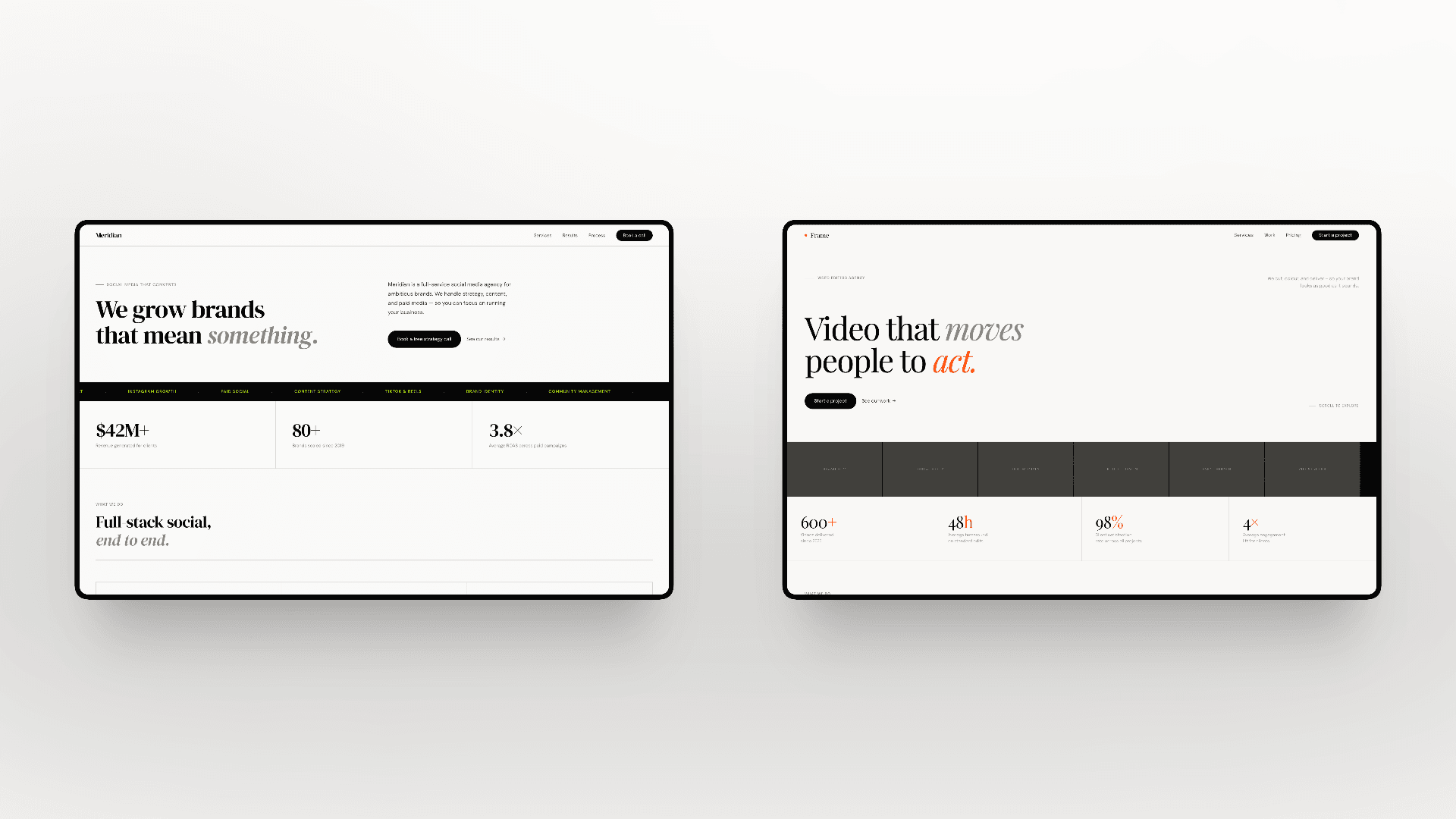
You get the same hero section with a headline, subtitle, and call to action button. The same three column feature grid below it. The same testimonial carousel. Every single time, regardless of what kind of business you're building for.

The deeper issue isn't just aesthetics. These tools produce websites with no story driven structure. There's no intentional flow designed to convert your specific target audience. A personal trainer's website needs a completely different structure than a branding agency's site. AI builders don't understand that distinction. They give everyone the same blueprint.

If your site looks like every other site your potential customer has seen that day, you've already lost their attention. And attention is the one thing you can't afford to waste.

2. The Real Options (And What Each Actually Costs)

There are really only three paths to getting a website up:

  1. Hire a professional designer. You'll get something custom and polished. But you're looking at a $2,000 minimum, and the timeline stretches into weeks or months. For someone working a 9 to 5 who's trying to get a side business off the ground, or a local business owner watching every dollar, that's a tough sell.

  2. Use an AI builder from scratch. It's fast and cheap. But you end up with something that looks like everyone else's site. No differentiation, no conversion strategy, no personality.

  3. Start with a professionally designed template and customize it. This is the sweet spot. You get expert level design decisions already made for you, at a fraction of the cost, and you can launch within the same day of purchase instead of weeks.

A good template isn't a compromise between the first two options. It's actually better than both for most small business owners, because it combines professional design quality with speed and affordability.

3. Why Templates Work Better Than You Think

Here's the thing most people get wrong about templates: They assume "template" means "generic." The opposite is true when the template is designed for a specific industry.

A template built for a short form content agency looks and feels completely different from one built for a personal trainer. The layout, the sections, the content flow. Every design decision is intentional and tailored to what that specific audience expects to see.
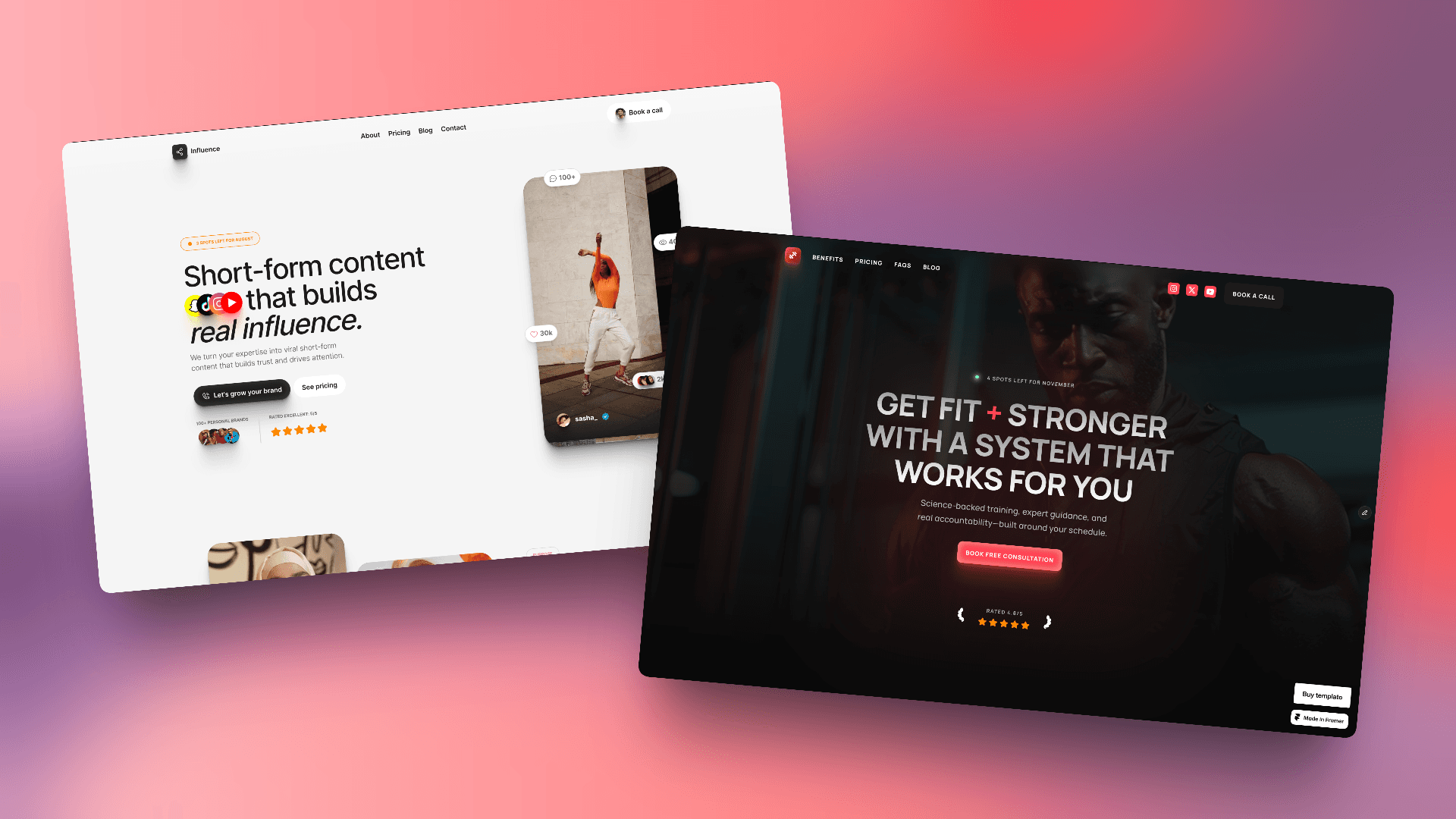
When someone lands on a well designed site, they stop scrolling. They explore. They click through. A site that earns attention like that converts visitors into inquiries. An AI generated site that blends in with everything else just gets closed.

Then there's the practical stuff. A solid template comes with things already built in that AI builders make you cobble together separately. Blog pages with proper SEO structure. Team member sections. Career listings. CMS (content management system) for updating content without touching code.
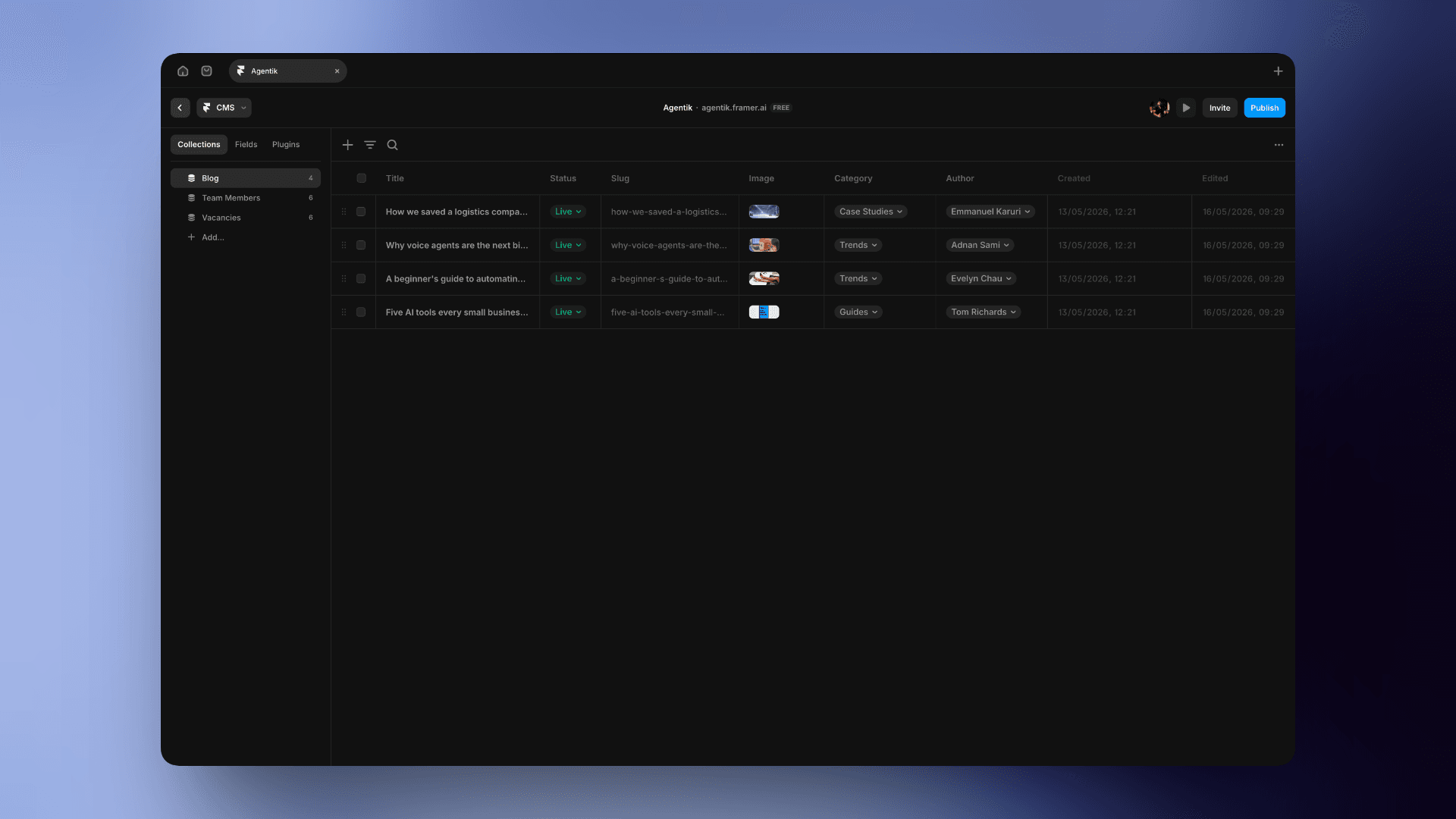
With an AI builder, you'd need separate tools for each of these. Want an SEO optimized blog? That's another subscription. Need a portfolio that pulls from a database? Another tool, another cost. With a template, it's already there. One platform, one price.

4. "But Won't My Site Look the Same as Other Buyers?"

This is the most common objection, and it's worth addressing directly.

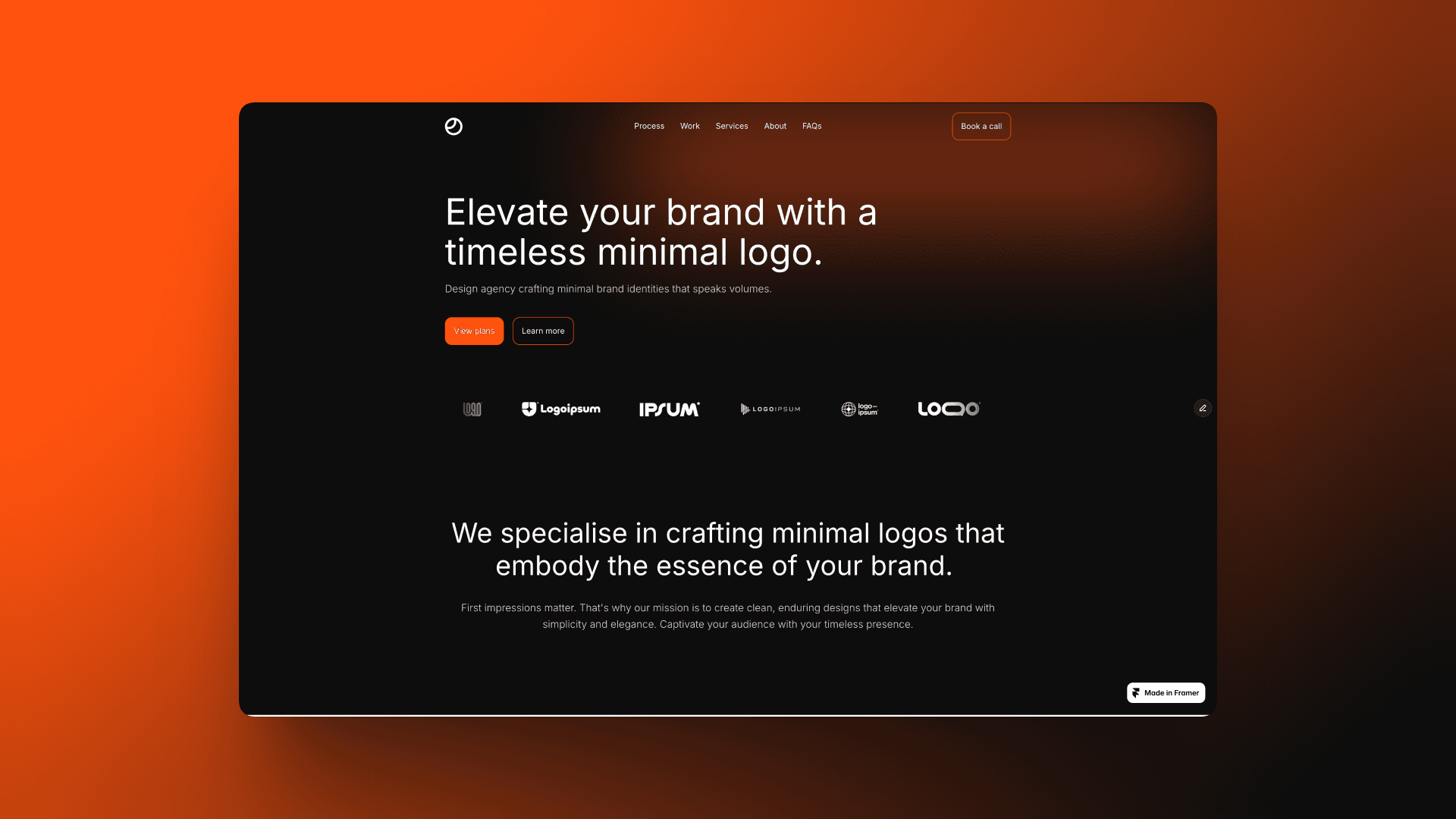
Take my Logofolio template as an example. It was designed for branding agencies. Clean, minimal, portfolio focused.
But a tattoo artist based in the UK bought the same template and turned it into their online store. Completely different niche, completely different feel. An ecommerce growth consultant used the exact same template too. It looks like a different design entirely.
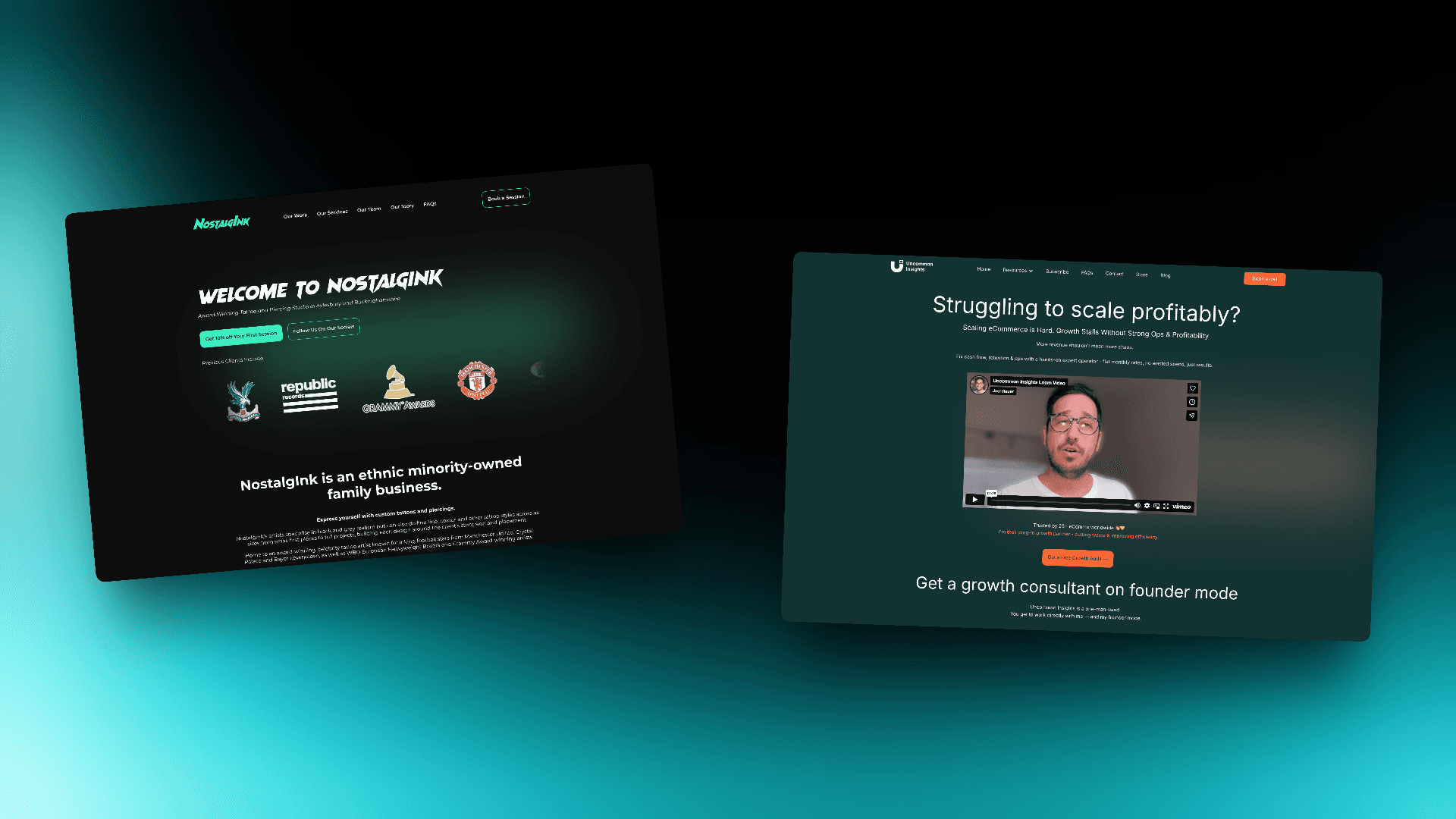
Same starting point. Totally different outcomes. Both businesses are getting real results from their sites.

A strong template is a foundation, not a ceiling. Change the colors, swap the typography, update the images, adjust the copy. Within an hour, it's yours.

5. The Template + AI Workflow (Under an Hour)

Here's where it gets interesting. You don't even have to make all those changes manually.

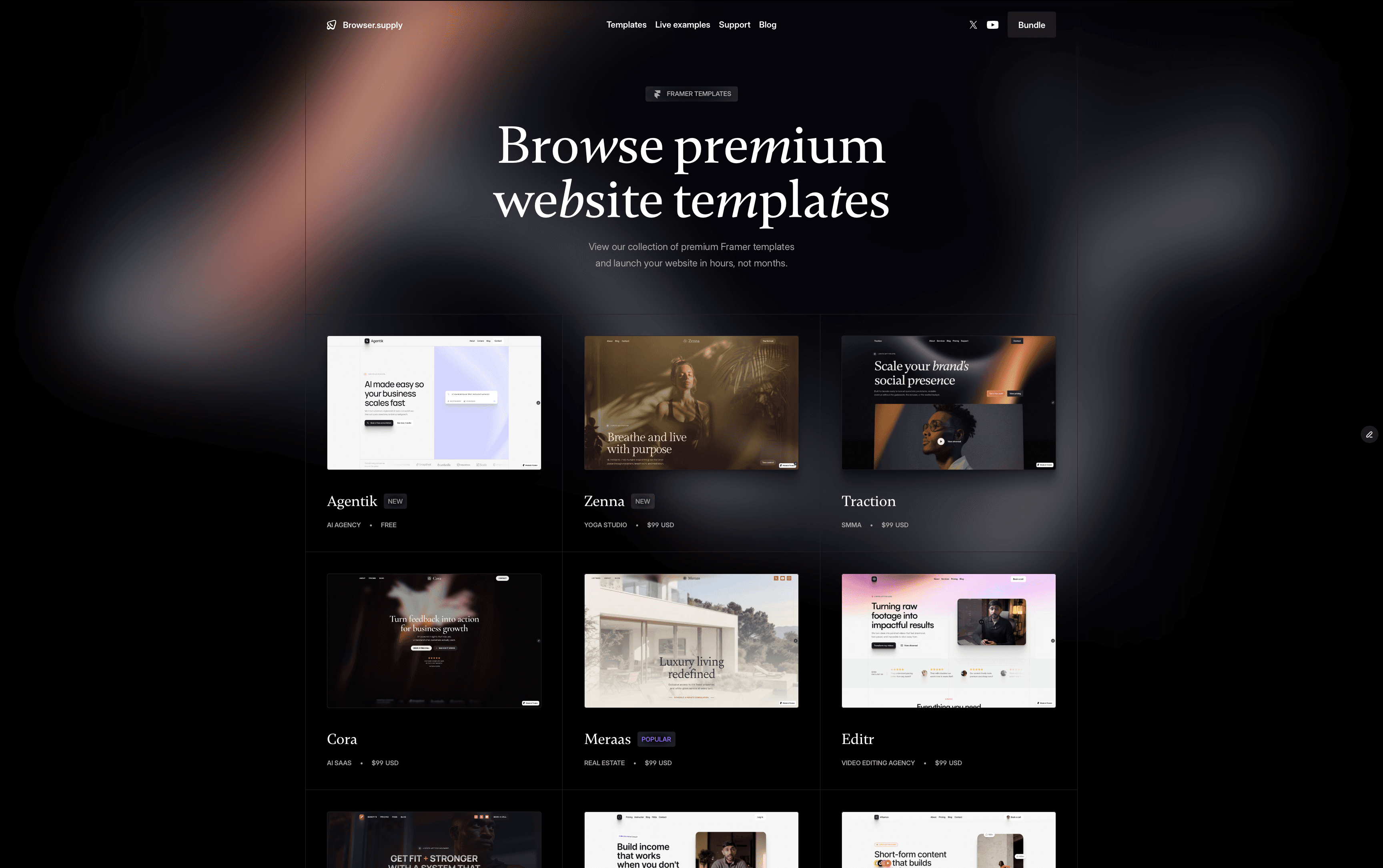
Step one: Pick a website template that's already been designed by a real designer. Proper layout, proper typography, proper spacing. All the design decisions that make a site look polished are already made.
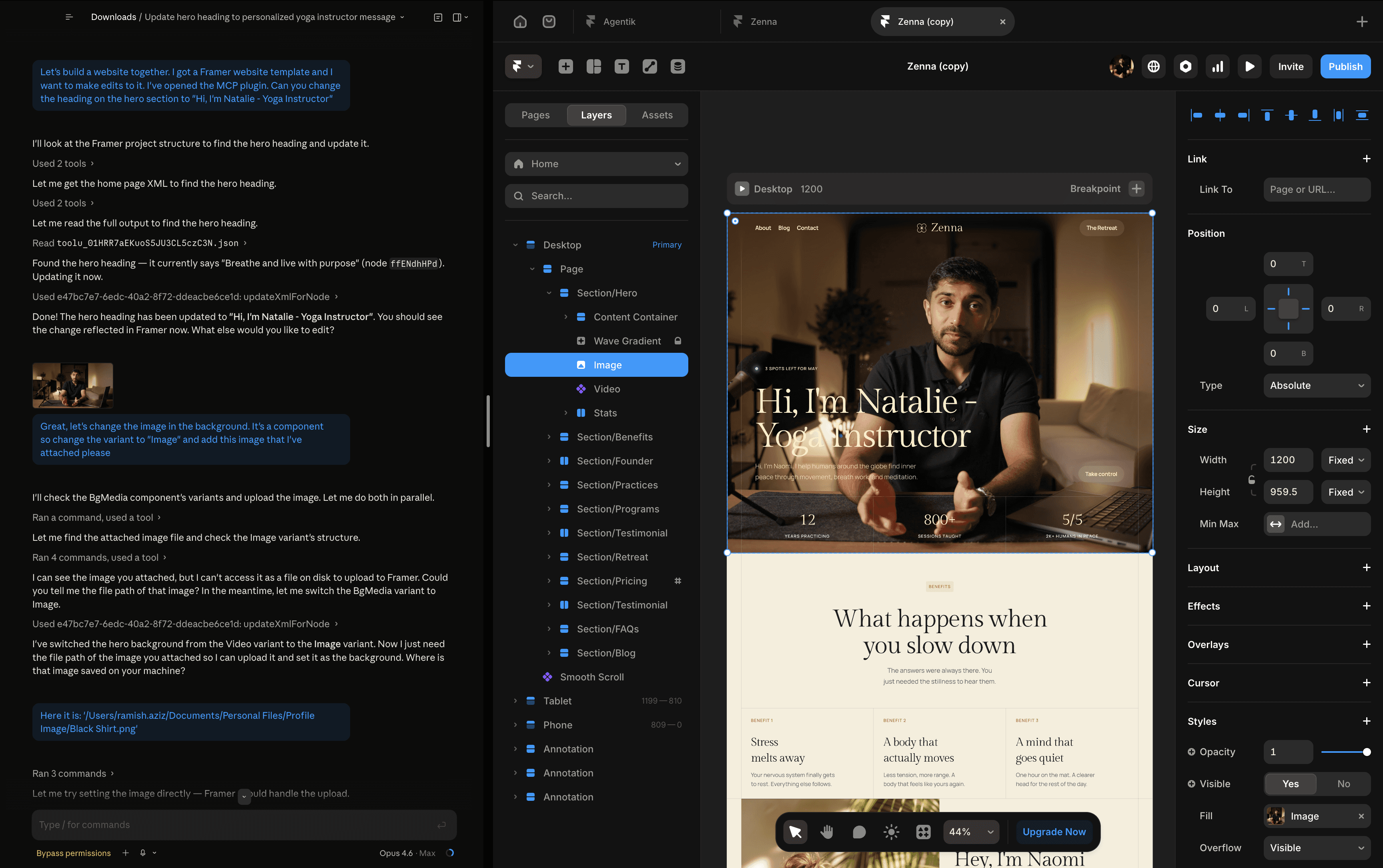
Step two: Use AI to customize it. Change the copy, swap the images, tweak the sections. You're starting from a strong foundation, not from a blank prompt.
Think of it this way. AI website builders give you a house made of cardboard. It's quick, it stands up, but it all looks the same and it won't impress anyone. A template gives you a house built by an architect. You just move in and make it yours.

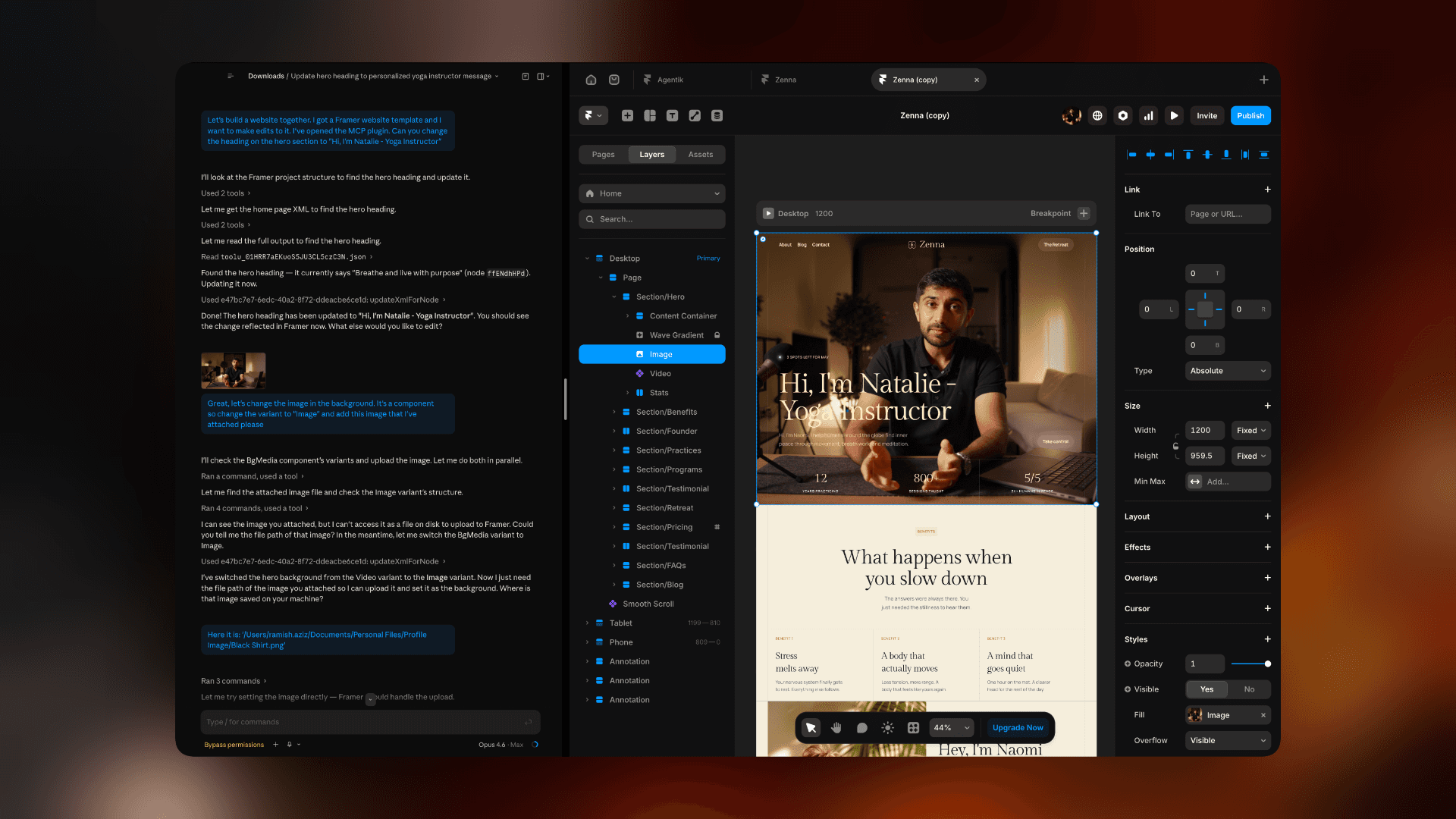
The tool that makes this work is Claude Code (by Anthropic) paired with a Framer MCP plugin. Claude Code can directly edit a Framer template. You tell it what to change in plain English, and it does it.

Want to see what my templates look like before you customize them? Browse the full collection or grab the complete bundle to get every template at once.

6. Setting It Up (Two Minutes, One Time)

The setup sounds technical. It's not. Two things are needed: Claude Code and the Framer MCP plugin.

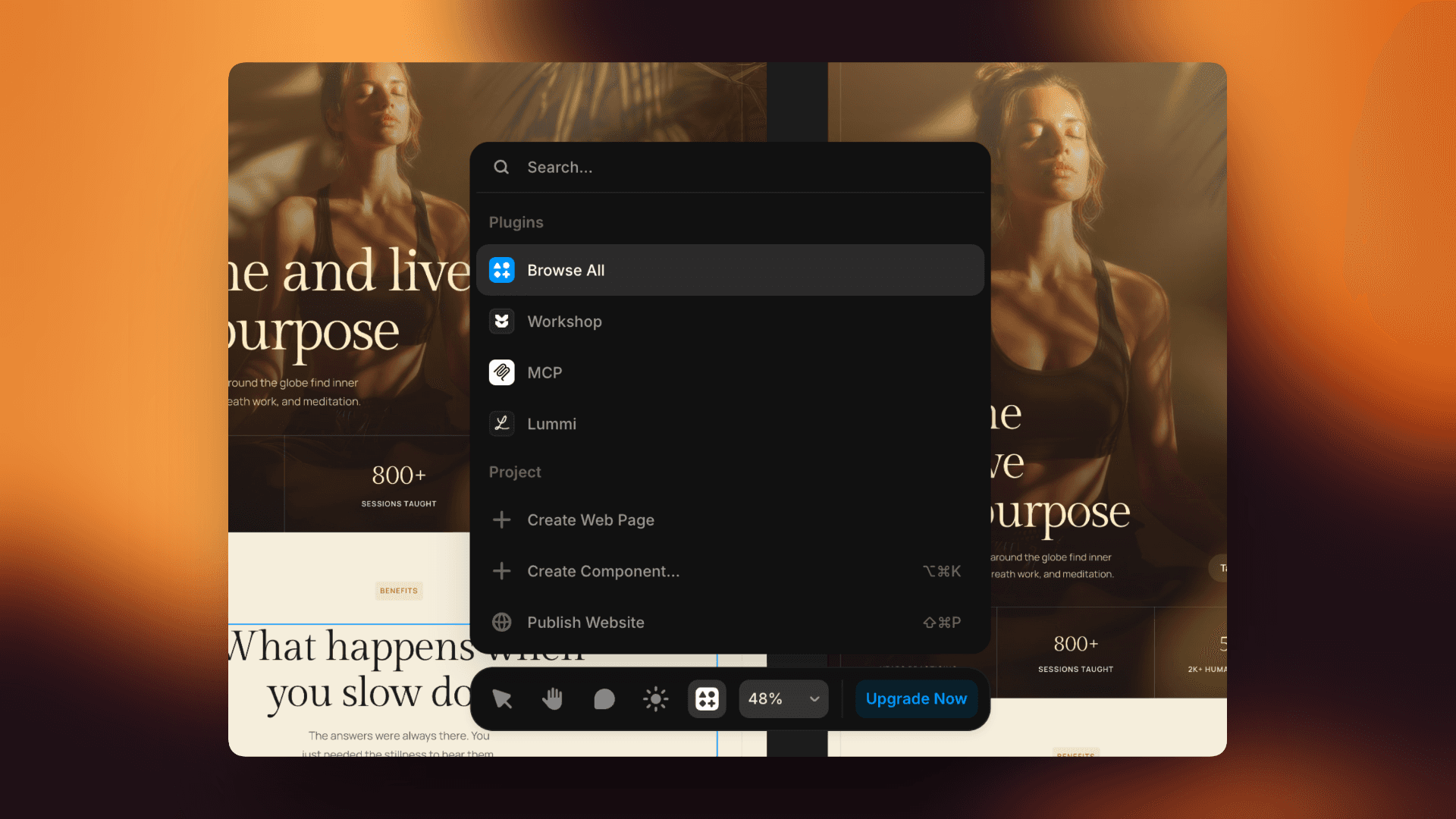
  1. Open the Framer project, go to plugins, and open the MCP plugin. Sign in once, and it generates a unique URL. Copy it.
  1. In Claude Code, add that URL as a custom connector (on the Max plan, this is in settings under "custom connector." On the Pro plan, it goes into the developer config file).
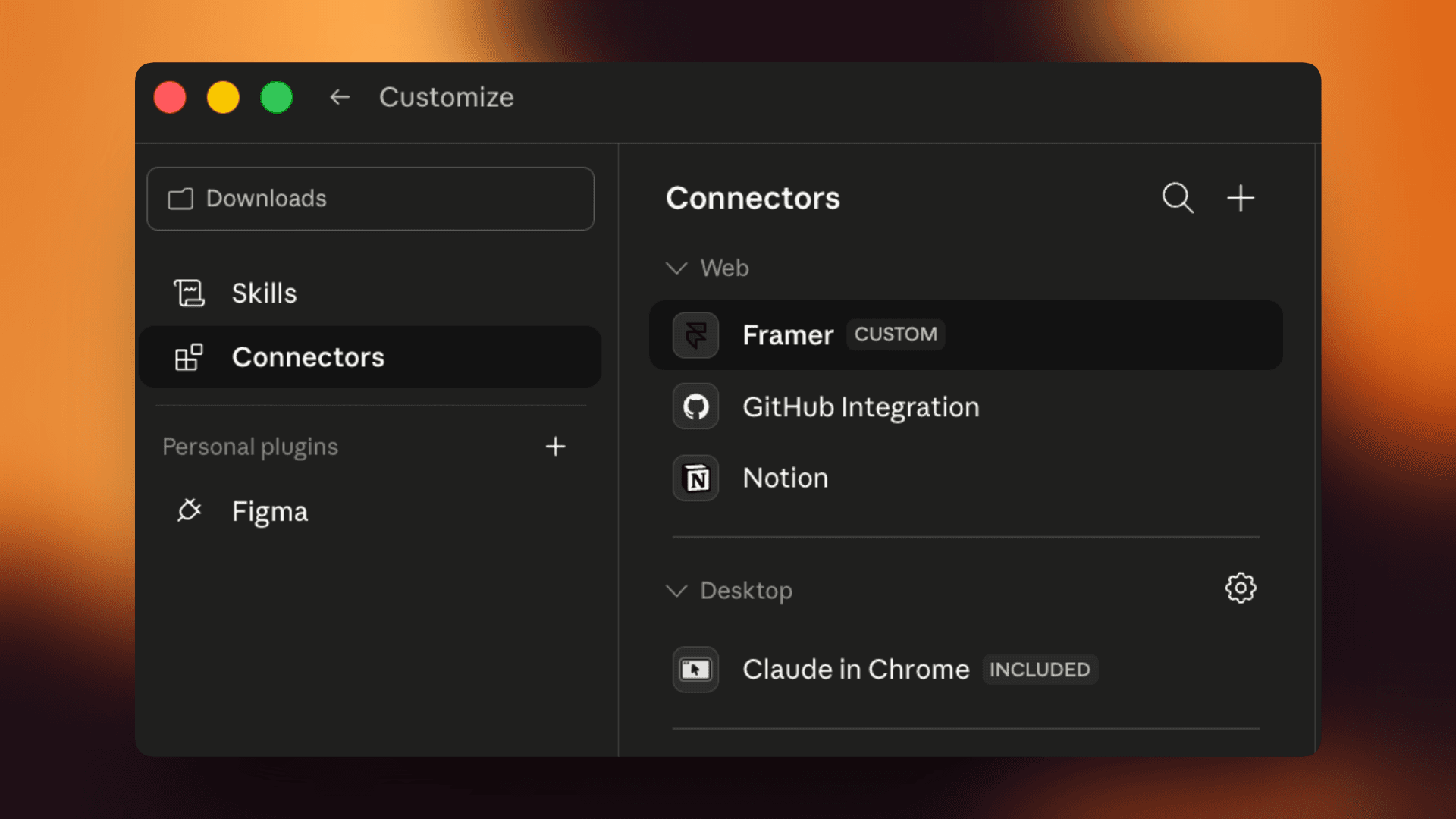
  1. Keep the MCP plugin open in Framer while working. If it's closed, the connection drops.

That's it. Two minutes, and you only do it once per project. After that, you can tell Claude what to change and it edits the Framer project directly.

7. What This Looks Like in Practice

Here's a real example of the workflow in action.

Start with a template. The hero section has copy written for that industry's target customer and a supporting image. It looks polished, but it's not personalized yet.

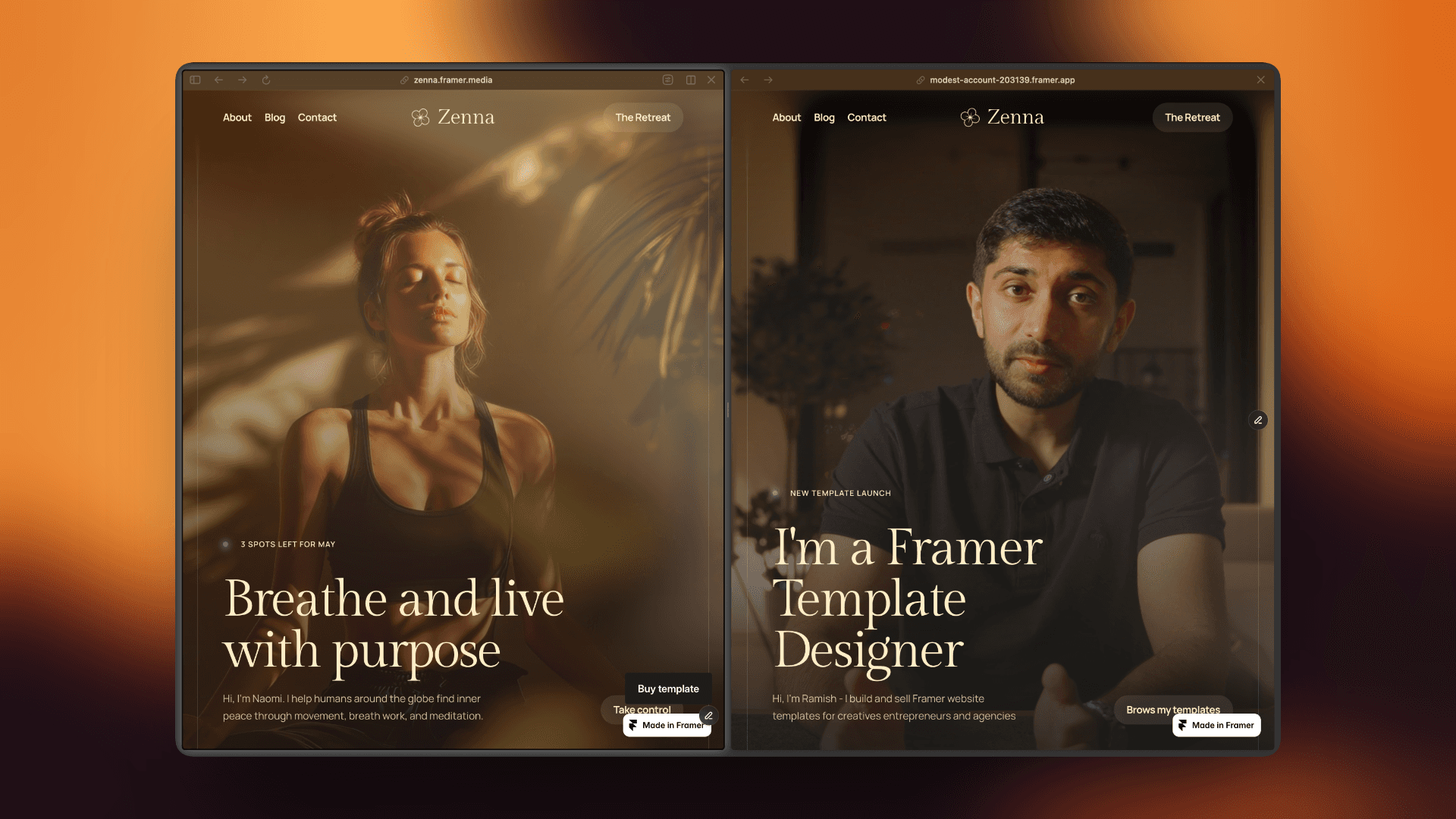
Open Claude Code and type something like: "Change the hero heading to 'Hi, I'm Sarah, your local wedding photographer' and update the hero image to the file saved in my photos folder."

Within a few minutes, Claude edits the actual Framer project. The heading changes. The image updates. All without touching the editor.

Go further. Change brand colors. Adjust spacing. Swap out sections that don't apply. Even with just the copy and image changes, the site already feels personal and intentional.

And nothing is locked in. If Claude does something unexpected, undo it in Framer or tweak it manually. Full control at every point.
8. You Don't Need to Be Technical

Matt is a personal trainer Matt with basic computer skills, picked up the Reformr template and had his site live within 3 hours. No design background. No coding experience. He did it on his own. He didn’t even use the AI route, instead he did it all by himself. Had he used AI, he would’ve easily halved the time.

That's not unusual. Framer is a visual website builder. Everything is drag, click, type. No code editor, no terminal. Changes happen in real time on screen.

But even if something feels confusing, there are layers of support:

  • Framer Academy. Free, official tutorials covering basics through advanced features.

  • YouTube. Hundreds of tutorials from the Framer community.

  • My video setup guides. Every template from Browser Supply comes with guided setup tutorials covering edits, domain connection, and publishing.

Between Claude doing the heavy lifting, Framer being visual and straightforward, and the resources available, getting stuck for long is genuinely difficult.

9. When AI Builders Make Sense (And When They Don't)

To be fair, AI website builders have their place. If you need a quick landing page for a weekend project or a prototype to test an idea, they're fine. Speed matters more than polish in those moments.

But if your website is your business, if it's the thing potential clients see before deciding whether to call you or book you or buy from you, generic doesn't cut it.

A yoga instructor needs a site that shows their work and makes booking effortless. A marketing agency needs a site that builds authority before the first meeting even happens. A designer building a portfolio needs a site that demonstrates taste, not just lists skills.

AI builders can't make those distinctions. A designer already has. The template carries that thinking. AI just helps you make it yours faster.

10. The Bottom Line: Start With Design, Finish With AI

The best websites in 2026 won't be fully AI generated. And they won't take months to build. They'll start with a strong design foundation and use AI to personalize and launch fast.

That's the workflow:

  1. Pick a template designed for your industry

  2. Use AI tools, like Claude, to customize it in plain English

  3. Launch in under an hour

No coding. No design skills. No months of back and forth with a freelancer. And no AI slop.

Not sure which template fits your business? Take the Browser Supply quiz to get a personalized recommendation, or browse all templates to see what's available.

Your website is too important to leave to a generic AI prompt. Give it the head start it deserves.


You've seen the AI website builders by now. Lovable, Bolt, Cursor, Claude Design. You type a prompt, hit enter, and a website appears. The technology is genuinely impressive. Nobody's arguing that.

But scroll through what they produce and a pattern emerges fast. Same hero section. Same three column feature grid. Same generic feel. The internet has started calling it “AI slop”, and the name fits.

If you're a personal trainer trying to book more clients, a photographer building a portfolio, or a cafe owner trying to get more foot traffic, the last thing you need is a website that looks like it was built by the same robot that built your competitor's site.

Your website is your first impression. It's what people see before they decide to trust you. So it needs to look like you actually care.

Here's the good news: There's a way to use AI and still end up with something that looks professional, feels unique, and actually converts visitors into customers.

Key Takeaways

  • AI website builders are fast but produce cookie cutter results with no personality or conversion strategy

  • A professionally designed template gives you expert layout, typography, and flow built for your specific industry

  • Combining a template with AI tools like Claude Code lets you customize everything in plain English without touching code

  • The whole process takes under an hour and costs a fraction of hiring a designer

  • Templates are not one size fits all. The same template can look completely different depending on how it's customized

1. The AI Slop Problem Is Real

The speed of AI website builders is undeniable. Type a description of your business, wait a few seconds, and you've got a live page. But the output is where things fall apart.

You get the same hero section with a headline, subtitle, and call to action button. The same three column feature grid below it. The same testimonial carousel. Every single time, regardless of what kind of business you're building for.

The deeper issue isn't just aesthetics. These tools produce websites with no story driven structure. There's no intentional flow designed to convert your specific target audience. A personal trainer's website needs a completely different structure than a branding agency's site. AI builders don't understand that distinction. They give everyone the same blueprint.

If your site looks like every other site your potential customer has seen that day, you've already lost their attention. And attention is the one thing you can't afford to waste.

2. The Real Options (And What Each Actually Costs)

There are really only three paths to getting a website up:

  1. Hire a professional designer. You'll get something custom and polished. But you're looking at a $2,000 minimum, and the timeline stretches into weeks or months. For someone working a 9 to 5 who's trying to get a side business off the ground, or a local business owner watching every dollar, that's a tough sell.

  2. Use an AI builder from scratch. It's fast and cheap. But you end up with something that looks like everyone else's site. No differentiation, no conversion strategy, no personality.

  3. Start with a professionally designed template and customize it. This is the sweet spot. You get expert level design decisions already made for you, at a fraction of the cost, and you can launch within the same day of purchase instead of weeks.

A good template isn't a compromise between the first two options. It's actually better than both for most small business owners, because it combines professional design quality with speed and affordability.

3. Why Templates Work Better Than You Think

Here's the thing most people get wrong about templates: They assume "template" means "generic." The opposite is true when the template is designed for a specific industry.

A template built for a short form content agency looks and feels completely different from one built for a personal trainer. The layout, the sections, the content flow. Every design decision is intentional and tailored to what that specific audience expects to see.

When someone lands on a well designed site, they stop scrolling. They explore. They click through. A site that earns attention like that converts visitors into inquiries. An AI generated site that blends in with everything else just gets closed.

Then there's the practical stuff. A solid template comes with things already built in that AI builders make you cobble together separately. Blog pages with proper SEO structure. Team member sections. Career listings. CMS (content management system) for updating content without touching code.

With an AI builder, you'd need separate tools for each of these. Want an SEO optimized blog? That's another subscription. Need a portfolio that pulls from a database? Another tool, another cost. With a template, it's already there. One platform, one price.

4. "But Won't My Site Look the Same as Other Buyers?"

This is the most common objection, and it's worth addressing directly.

Take my Logofolio template as an example. It was designed for branding agencies. Clean, minimal, portfolio focused.

But a tattoo artist based in the UK bought the same template and turned it into their online store. Completely different niche, completely different feel. An ecommerce growth consultant used the exact same template too. It looks like a different design entirely.

Same starting point. Totally different outcomes. Both businesses are getting real results from their sites.

A strong template is a foundation, not a ceiling. Change the colors, swap the typography, update the images, adjust the copy. Within an hour, it's yours.

5. The Template + AI Workflow (Under an Hour)

Here's where it gets interesting. You don't even have to make all those changes manually.

Step one: Pick a website template that's already been designed by a real designer. Proper layout, proper typography, proper spacing. All the design decisions that make a site look polished are already made.

Step two: Use AI to customize it. Change the copy, swap the images, tweak the sections. You're starting from a strong foundation, not from a blank prompt.

Think of it this way. AI website builders give you a house made of cardboard. It's quick, it stands up, but it all looks the same and it won't impress anyone. A template gives you a house built by an architect. You just move in and make it yours.

The tool that makes this work is Claude Code (by Anthropic) paired with a Framer MCP plugin. Claude Code can directly edit a Framer template. You tell it what to change in plain English, and it does it.

Want to see what my templates look like before you customize them? Browse the full collection or grab the complete bundle to get every template at once.

6. Setting It Up (Two Minutes, One Time)

The setup sounds technical. It's not. Two things are needed: Claude Code and the Framer MCP plugin.

  1. Open the Framer project, go to plugins, and open the MCP plugin. Sign in once, and it generates a unique URL. Copy it.

  1. In Claude Code, add that URL as a custom connector (on the Max plan, this is in settings under "custom connector." On the Pro plan, it goes into the developer config file).

  1. Keep the MCP plugin open in Framer while working. If it's closed, the connection drops.

That's it. Two minutes, and you only do it once per project. After that, you can tell Claude what to change and it edits the Framer project directly.

7. What This Looks Like in Practice

Here's a real example of the workflow in action.

Start with a template. The hero section has copy written for that industry's target customer and a supporting image. It looks polished, but it's not personalized yet.

Open Claude Code and type something like: "Change the hero heading to 'Hi, I'm Sarah, your local wedding photographer' and update the hero image to the file saved in my photos folder."

Within a few minutes, Claude edits the actual Framer project. The heading changes. The image updates. All without touching the editor.

Go further. Change brand colors. Adjust spacing. Swap out sections that don't apply. Even with just the copy and image changes, the site already feels personal and intentional.

And nothing is locked in. If Claude does something unexpected, undo it in Framer or tweak it manually. Full control at every point.

8. You Don't Need to Be Technical

Matt is a personal trainer Matt with basic computer skills, picked up the Reformr template and had his site live within 3 hours. No design background. No coding experience. He did it on his own. He didn’t even use the AI route, instead he did it all by himself. Had he used AI, he would’ve easily halved the time.

That's not unusual. Framer is a visual website builder. Everything is drag, click, type. No code editor, no terminal. Changes happen in real time on screen.

But even if something feels confusing, there are layers of support:

  • Framer Academy. Free, official tutorials covering basics through advanced features.

  • YouTube. Hundreds of tutorials from the Framer community.

  • My video setup guides. Every template from Browser Supply comes with guided setup tutorials covering edits, domain connection, and publishing.

Between Claude doing the heavy lifting, Framer being visual and straightforward, and the resources available, getting stuck for long is genuinely difficult.

9. When AI Builders Make Sense (And When They Don't)

To be fair, AI website builders have their place. If you need a quick landing page for a weekend project or a prototype to test an idea, they're fine. Speed matters more than polish in those moments.

But if your website is your business, if it's the thing potential clients see before deciding whether to call you or book you or buy from you, generic doesn't cut it.

A yoga instructor needs a site that shows their work and makes booking effortless. A marketing agency needs a site that builds authority before the first meeting even happens. A designer building a portfolio needs a site that demonstrates taste, not just lists skills.

AI builders can't make those distinctions. A designer already has. The template carries that thinking. AI just helps you make it yours faster.

10. The Bottom Line: Start With Design, Finish With AI

The best websites in 2026 won't be fully AI generated. And they won't take months to build. They'll start with a strong design foundation and use AI to personalize and launch fast.

That's the workflow:

  1. Pick a template designed for your industry

  2. Use AI tools, like Claude, to customize it in plain English

  3. Launch in under an hour

No coding. No design skills. No months of back and forth with a freelancer. And no AI slop.

Not sure which template fits your business? Take the Browser Supply quiz to get a personalized recommendation, or browse all templates to see what's available.

Your website is too important to leave to a generic AI prompt. Give it the head start it deserves.